For restaurants, cafés and pubs
Bookings, orders and dockets on one iPad.
Plateline takes your table bookings, takeaway orders and orders from the table, then sends every dish to an iPad at the pass. Staff hours and stock counts live there too. One simple app, one monthly price.
14 days free, then A$500 a month
Go on, tap a dish to send it out.
- T4 2 × Margherita out
- Booking Lee · 4 people · 7:30pm
- Takeaway Grace · pickup 6:15pm
- AI call booked a table for 2 at 8pm
- G2 1 × Funghi · No garlic out
- T7 asked for the bill
- Booking Patel · 6 people · beer garden
- Takeaway Ben · 2 × Rigatoni ragu collected
What's in it
Everything a busy service needs, and nothing it doesn't.
Table bookings
Guests book from your Google listing or website. Only times you're open and tables that fit are offered.
Takeaway orders
Guests order ahead from your real menu, with add-ons and "leave off the onion", and pick a pickup time.
Order from the table
Each table gets a QR code. Guests order from their phone, or staff add items from the floor plan.
iPad dockets
Every order lands at the pass. Tap each dish as it goes out. Prefer paper? Plug in a docket printer.
Your floor, your sections
Drag tables to match the real room. Add a beer garden, a patio or a bar, and see who's sitting where.
Staff timesheets New
Staff tap their name on the iPad and enter their hours. You see weekly totals and download them for payroll.
Stock and usage New
Staff tap − and + as stock gets used or delivered. See what's low, what to order and what each week cost you.
Takings behind your PIN
Everyone shares one login on the iPad. Sales, settings and staff hours stay locked until you enter your PIN.
AI that answers the phone Coming soon
An add-on that picks up every call, takes bookings against your real floor and takes takeaway orders.
Try it
Order like a guest, then watch it land at the pass.
Add a dish or two, change them how you like, and send the order. This is how a takeaway order reaches your kitchen.
Your order shows up here the moment you send it.
One subscription
Swap the pile of systems for one app.
What you juggle now
- A booking system with its own login and fees
- An online ordering app for takeaway
- A point-of-sale for orders at the table
- A docket printer that jams mid-service
- Someone running to answer the phone
- Paper timesheets stuck to the fridge
- Stock counted on a clipboard, orders guessed
With Plateline
- One login on the iPad at the counter
- Bookings, takeaway and table orders together
- Dockets on screen, ticked off dish by dish
- Takings hidden behind your owner PIN
- Staff hours added up, ready for payroll
- Stock counted with a tap, low items flagged
- One monthly bill, cancel when you like
What could you save?
Move the sliders to match your restaurant. The starting numbers are only an example.
You'd keep about a month
An estimate from the numbers above. Delivery apps that bring you new customers may still be worth keeping alongside Plateline.
Start savingSetup
Ready before the dinner rush.
No installer, no training day. Setup walks you through it the first time you log in.
Sign up here
Your restaurant's name, your email and a password. Then pay by card through Stripe.
Tell it how you run
The days and hours you open (split lunch and dinner is fine), your tables and your menu.
Drag your tables into place
Arrange the floor plan to look like your room, one section at a time.
Add your links to Google
Paste your booking and order links into your Google listing and website. Guests never download anything.
Coming soon: the AI phone add-on
Never miss a booking because the phone rang mid-service.
Plateline's AI answers every call in your restaurant's name. It checks your real tables and hours, makes the booking or takes the takeaway order, and it shows up in the app with the full conversation.
Press play to hear how a call goes. This is an example call.
New: staff timesheets
Hours in on the iPad. Payroll out in one tap.
No more paper timesheets on the fridge. At the end of a shift, staff tap their name on the restaurant's iPad and put in when they started, when they finished and how long their break was. Plateline adds up the hours.
- Staff tap their name. No extra logins or passwords for anyone.
- The hours add themselves up. Breaks come off, and late closes past midnight are handled.
- You check the week. Your owner PIN shows each person's weekly total and lets you fix or delete an entry.
- Ready for payroll. Download the week as a spreadsheet (CSV) for your bookkeeper or payroll software.
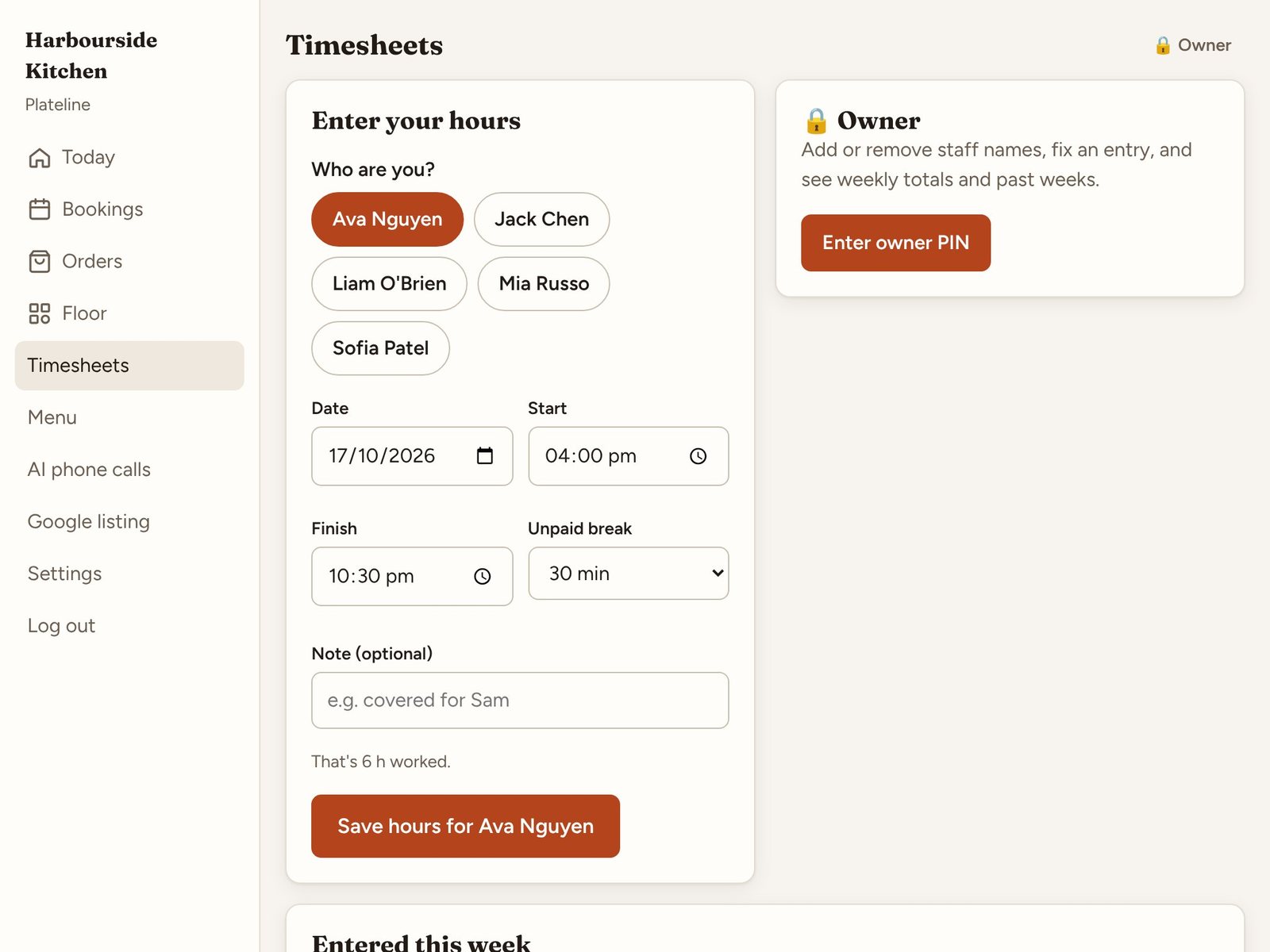
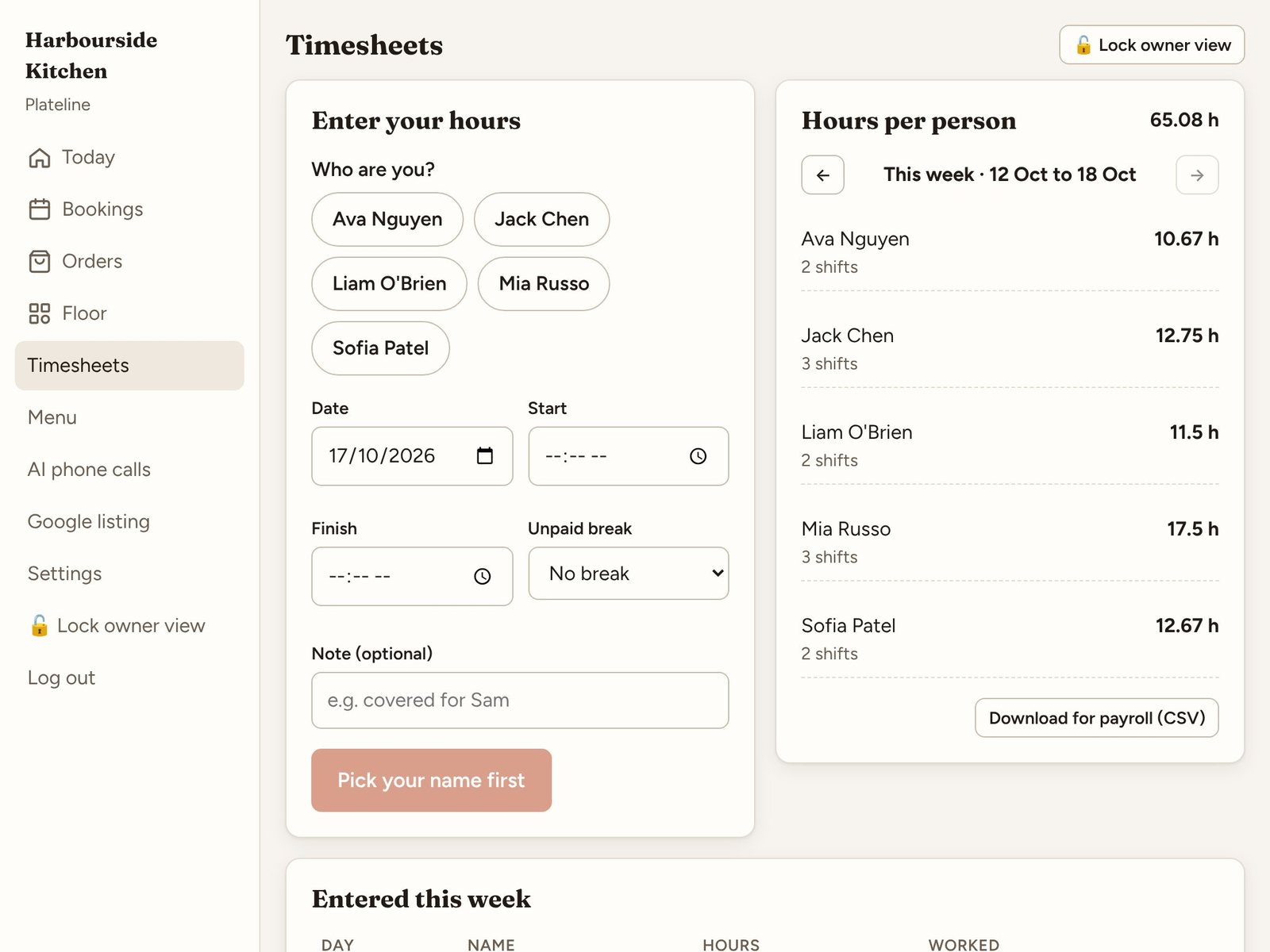
Real screens from the Plateline app. Find it under More, then Timesheets.
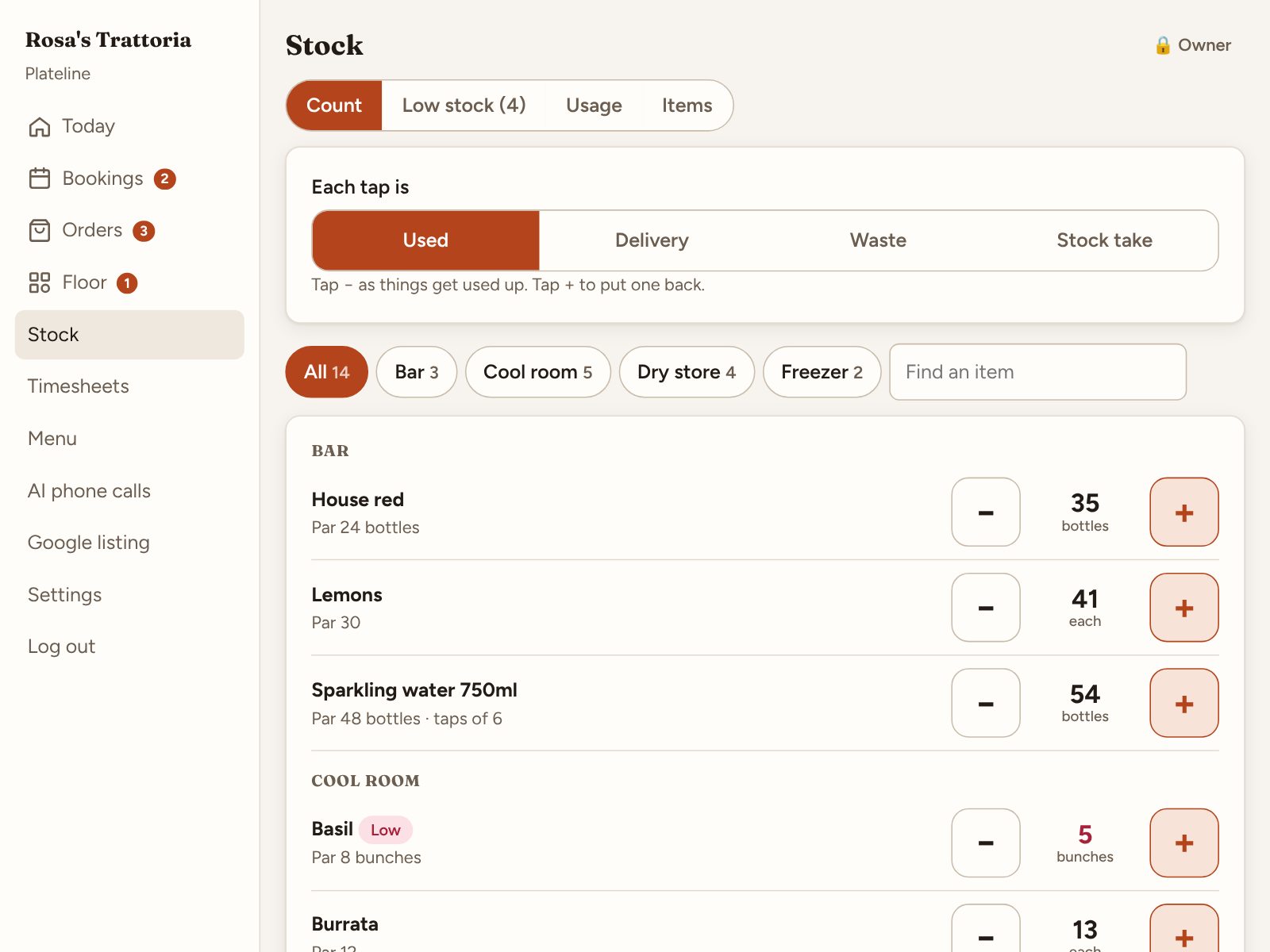
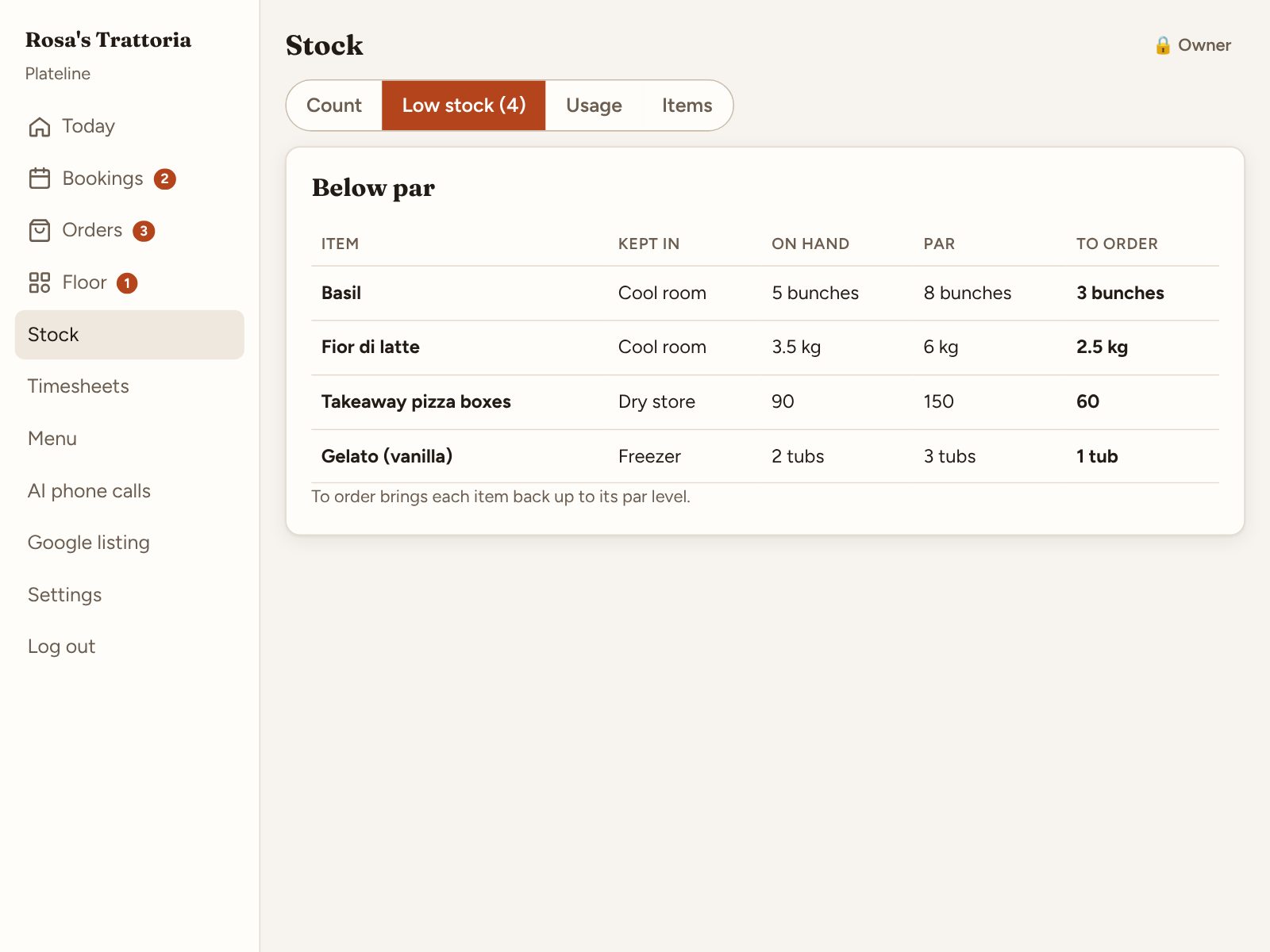
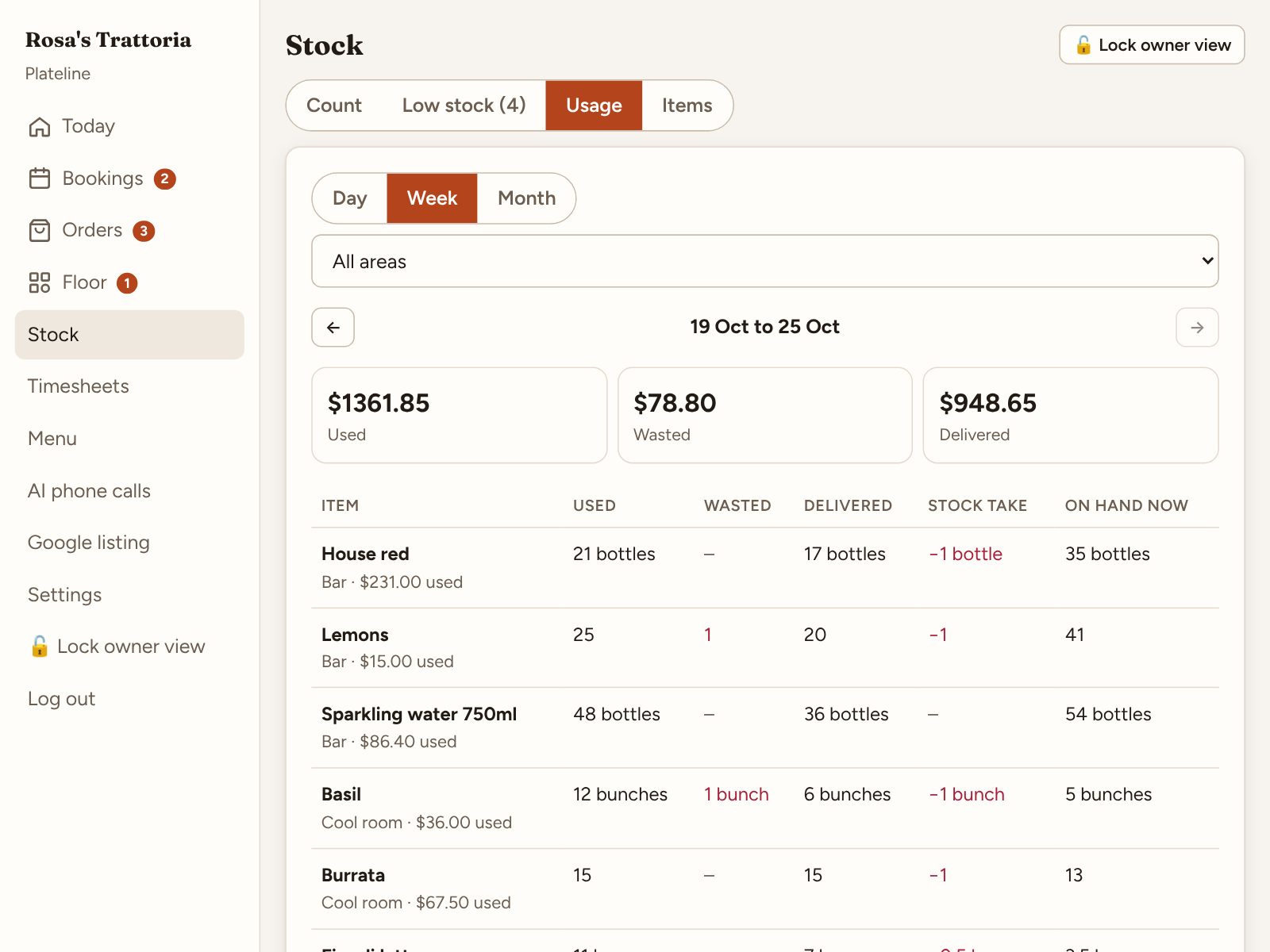
Real screens from the Plateline app. Find it under More, then Stock.
New: stock
Count stock with a tap. Know what to order.
No more clipboards in the cool room. Staff tap − as things get used and + when a delivery comes in. Plateline keeps the count, flags what's running low and shows you where the money went.
- Big − and + buttons. Pick Used, Delivery, Waste or Stock take, then tap. No logins, no typing.
- See what's low. Set a par level for each item. Plateline lists what's under it and how much to order.
- Usage by day, week or month. Your owner PIN shows what was used, wasted and delivered, with costs.
- Download it. The stock list and usage come out as a spreadsheet (CSV) for ordering or your accountant.
Each tap is
Tap − as things get used up. Tap + to put one back.
To order
Tonight so far
- Every tap is logged here with the time and reason.
Pricing
One price. Every feature.
No per-booking fees, no per-cover charges and no commission on takeaway. Use it on as many iPads and phones as you like.
Try it free for 14 days. Your card is charged when the trial ends, and you can cancel before then.
- 1 × Table bookingsincl.
- 1 × Takeaway ordersincl.
- 1 × Table QR orderingincl.
- 1 × iPad docketsincl.
- 1 × Floor planincl.
- 1 × Staff timesheetsincl.
- 1 × Stock and usageincl.
- + Paper docketsincl.
- + AI phone answeringsoon
Cancel any time · Charged in AUD
Questions
Before you sign up
Do my guests need to download an app?
No. They book and order in their phone's browser, from your Google listing, your website or the QR code on their table.
What hardware do I need?
Any iPad, tablet or computer with a web browser. An iPad at the pass works best for dockets. A docket printer is optional.
Can my staff use it?
Yes. The restaurant has one login that everyone shares on the iPad. Your takings and settings stay locked behind an owner PIN that only you know.
How do staff timesheets work?
Add your staff names once with your owner PIN. After each shift, staff tap their name on the iPad and enter their start, finish and break. You see each person's hours for the week, can fix any entry, and download the week as a CSV file for payroll.
How does stock counting work?
Add your items once with your owner PIN: where each is kept, its unit, a par level and what it costs. Staff then tap − and + on the iPad as things get used, wasted or delivered, or type in a full stock take. You see what's below par and how much to order, usage and costs per day, week or month, and you can download both as CSV files.
Will it work with my Google listing?
Yes. Plateline gives you a booking link and an order link to paste into your Google Business Profile, and a one-line code to add booking buttons to your own website.
Is there a contract?
No. You pay monthly and can cancel any time from your billing page. Your bookings stay yours.
I have more than one restaurant.
Sign up each one with its own email. Each restaurant gets its own login, menu, floor plan and guest links.